








Subscribe to Newsletter
Enter your email address below and subscribe to our newsletter

You are the investigator

Happenstance: People search, contacts and warm intros
You need someone who's knowledgeable about a specific topic. Somewhere among old emails, LinkedIn contacts, and appointments, such a person must be—you just can't remember their name. Or perhaps you want to reach someone at a company and are wondering who could introduce you. This is precisely where we come in. Happenstance to.
This service makes your existing contacts searchable. You describe who you're looking for and receive matching contacts along with context and potential connections. This is particularly useful for OSINT (Open Source Intelligence) when you're looking for conversation partners, experts, or access to an organization. Here, we'll show you how to get started and the six search methods available.
A typical people search usually starts with a name. Happenstance can begin with a question: „Who do I know who used to work at this company?“ or „Who could put me in touch with someone on this team?“ To do this, it combines information from connected accounts, supplements professional profiles, and takes into account networks that friends or groups share with you.
The key difference compared to traditional OSINT tools is that the focus is on finding a person. Domain searches, reverse image lookups, or registry checks are still performed with other suitable tools. Happenstance helps you, for example, to find someone with industry knowledge, identify mutual contacts before an interview, or select the right person for a follow-up question; your own network remains the crucial starting point.
Start with the source where your useful contacts are actually located. A work email inbox or Google Contacts can be sufficient for an initial search. These sources serve different purposes:
| source | What information does Happenstance describe for this? | How this helps you with your search |
|---|---|---|
| Gmail | Email headers: who wrote to whom and when or how often; no message text or attachments. | Reconnecting with previous conversation partners and prioritizing relationships |
| Outlook | Also email metadata; according to the provider, no content or attachments. | Establishing business contacts through correspondence |
| Google Calendar | Linked appointment information, especially shared participants and meetings, as relationship signals. | Reconnect with people you had appointments with |
| Google Contacts | Saved contacts; matching and enrichment with professional profiles | Search by role or company even without a saved current job title |
| Own connections; for supported exports, additionally released information and message metadata. | Make professional network searchable | |
| X | Follower relationships and the mapping of handles to professional profiles | Find people behind usernames by occupation |
| In particular, mutual followers and their assignment to professional profiles | Developing social contacts, including those related to professional backgrounds |
„Connecting“ doesn't mean the same technical process everywhere. Supported accounts use OAuth; for supported network exports, Happenstance describes local processing in the browser with a preview before uploading. What's crucial is what you actually grant access to with each connector. For example, granting access to an Instagram contact isn't a blanket permission for all your Instagram activity.
The saved contact information and the added profile details serve various purposes: One piece of information explains, how to reach someone, the other one, why the person is a good fit for the search. Several sources are to be combined to create a personal profile. The website now also mentions Apple Contacts via the iPhone app; the sources described above are sufficient for the following processes.
Perhaps you were in contact with a developer some time ago who is familiar with payment services. Searching your inbox for individual keywords would be tedious. In Happenstance, you simply describe the person you're looking for.
Open Happenstance Chat. The publicly visible search field is called... Ask Happenstance, on the left you will find New chat. In this case, first connect your appropriate mailbox via the Connector area. At Google, Gmail, Calendar and Contacts are separate sources – choose consciously which one you want to start with.
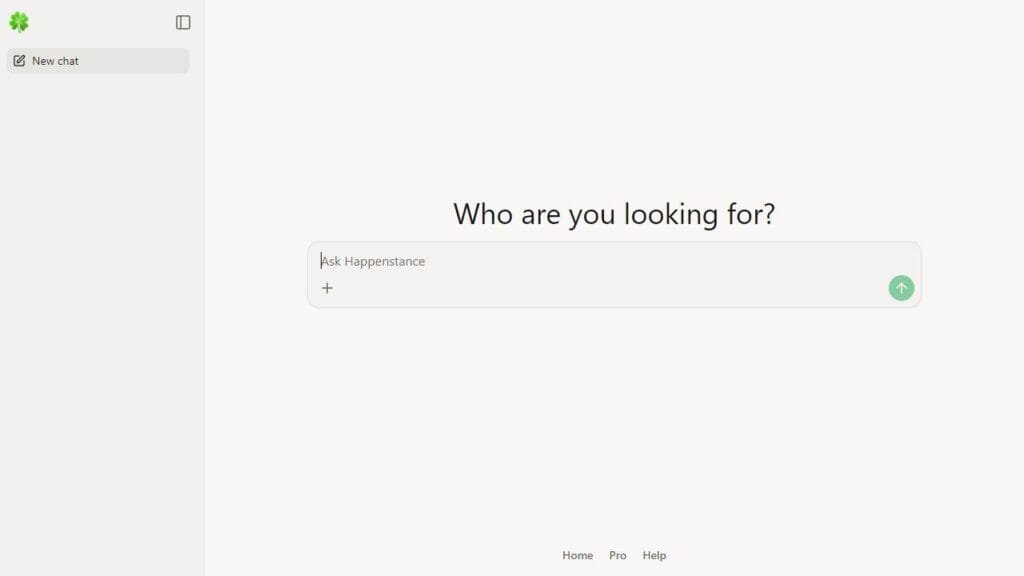
Here's a sample search query:
Find people in my own connections who have experience with payment infrastructure. Explain why each person matches and how I know them.
You're looking for a combination of experience and a connection to yourself. The results shown include people with a professional background and an explanation of why they're a good fit. If the list is too broad, add their previous company or a more specific job title. As a next step, you can identify the person based on their profile and access their previous contact in your own inbox.
The Gmail description explains this switch from message search to people search. Border: The search depends on the connected sources. A contact from a non-connected mailbox may be missing.
You're researching a topic and need someone with practical experience, for example, someone from the field of open data. Start the chat by stating the knowledge you need and then narrow it down:
Find people in my network who work on open data or investigative journalism, preferably in Germany. Show their roles, organizations and why they match.
For company research, you can modify the question: „Who in my network previously worked at [company]?“ For a technical question, you would mention a specific experience instead of a very general job title. The recruiting page illustrates this principle using described roles; it can also be used to find interview partners.
Use the results as a short candidate list: Which person has actually worked on your topic? Who is in the relevant organization? Who has a direct connection? If a result is particularly interesting, ask Happenstance as a follow-up request which professional positions or publicly documented projects you would like to investigate further.
This turns „I need any expert“ into a selection for the next two or three requests. Border: A suitable profile description doesn't necessarily indicate whether someone currently has time or is willing to be interviewed. Check their current role before writing a cover letter.
Now you know the organization, but you don't yet have a suitable contact person. Ask a question in the chat like this:
Who can introduce me to someone working on payments at Stripe? Show the strongest introduction paths available to me.
The warm introductions guide describes three ways: directly, via a Happenstance friend, or via a group member. So you not only get a name at the target company, but ideally also the person through whom the contact could be established.
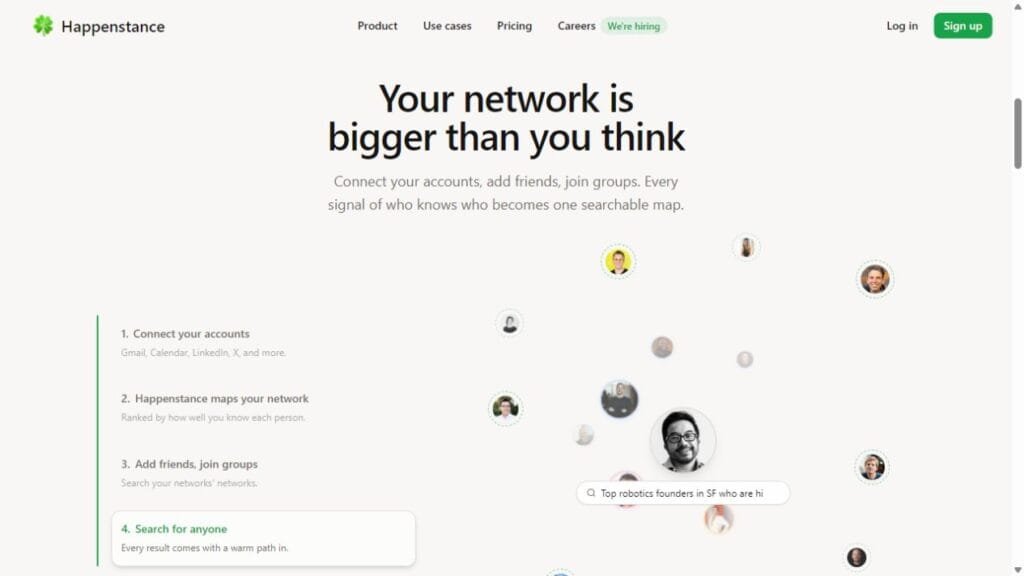
The public product demo illustrates source merging and network search. It shows sample data from the provider, not a search in one of our connected accounts. Recorded on November 11, 2026.
Here relationship strength Useful. Happenstance evaluates relationships based on available signals such as email exchanges, their frequency and recency, joint meetings, and contact and follower relationships. It considers both sides for its assessment: How well do you know the person making the connection – and how well do they know the target person? The Relationship Intelligence Guide explains the evaluation process.
Choose a plausible approach and briefly ask your contact if an introduction would be appropriate. Include a sentence explaining why you'd like to speak with them. Happenstance Chat can also prepare a draft of this request; you decide whether to actually make contact.
Border: The strongest option shown is a prioritization of your request, not a commitment from the people involved.
Before a conversation, you might want to know where a name sounds familiar or who knows you both. Open a new chat and name the person as clearly as possible:
How am I connected to [full name], [company]? Show the mutual connections available through my network, friends and groups.
Include company, role, or a public profile reference if the name appears frequently. The official Mutual Connections statement describes outcomes involving common people, the origin of the connection, and the strength of both relationships.
This allows you to find common ground before the meeting or select the most suitable contact for follow-up questions. If necessary, ask: „Which of these mutual connections is my best introduction path?“
This process involves two people – you and the person you are looking for – within the networks accessible to you. This does not guarantee a complete relationship graph for any two outsiders. Border: Similar names or automatically assigned profiles need a brief comparison with company and professional background.
Sometimes the right person is further away. That's what happens. Friends and Groups. An accepted friend shares their network with you and, in turn, gains access to yours. In a group, members pool their networks, such as a research team, an alumni association, or a professional network.
Use the friends and groups section of your account to invite a suitable contact or join a group. A friend status on LinkedIn alone does not replace this sharing on Happenstance. Start with a small circle of people with whom you actually want to engage in this type of exchange.
Then go back to the chat and explicitly name the expanded search area:
Search my friends‘ connections and the groups I belong to for people with experience in public-interest technology. Show who connects me to each person.
The additional information comes from a team member. For a team, this can lead to a distributed search for sources and expertise: one person knows the industry expert, another knows someone at the company in question. The account mapping guide demonstrates how to search for this information using a team network.
According to the pricing page, Friends and Groups are unlimited even in the free plan. Border: Sharing works both ways. A group expands the search space and, at the same time, the circle of people who can search your shared network.
Are you already preparing a conversation in an AI assistant? Then you can add the network search there. Happenstance documents official connections and an MCP server. MCP is the connection your assistant uses to access Happenstance tools.
In ChatGPT: Open via the official Happenstance guide Click on the linked Happenstance app page. Connect and log in with your Happenstance account. Then you can explicitly have the assistant search for suitable contacts using Happenstance. Whether a connection is available in your workspace also depends on its settings.
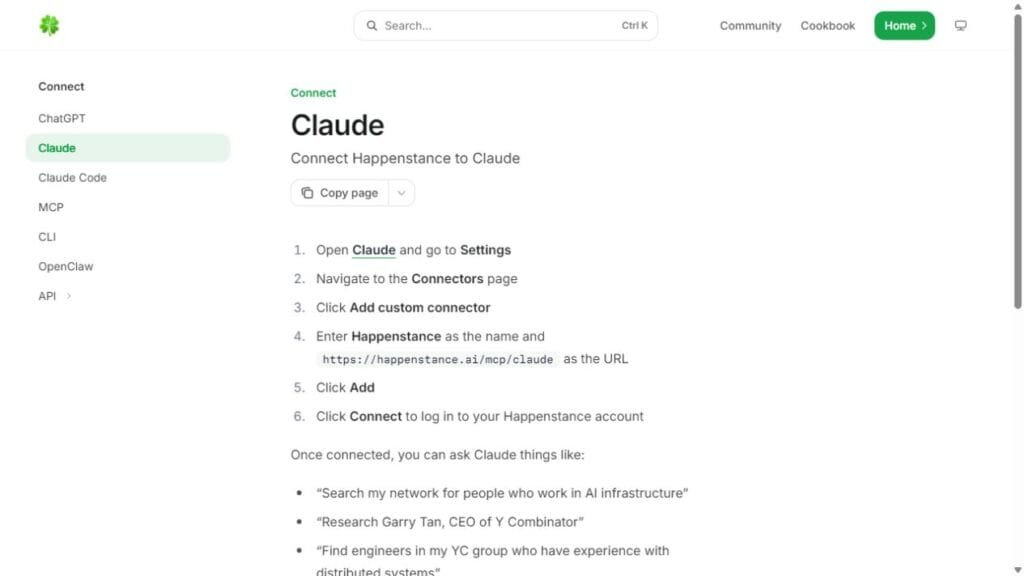
In Claude: The Setup instructions calls Settings → Connectors → Add custom connector. Bear the name Happenstance and this address:
https://happenstance.ai/mcp/claude
Click Add, thereafter Connect and log in to Happenstance. The general MCP address for other suitable clients is... https://happenstance.ai/mcp; Both endpoints use OAuth. For manual MCP connection in ChatGPT, there is also the... OpenAI tutorial.
A practical task after connecting:
Use Happenstance to find people in my network with experience in open-source data platforms. Explain the matches and draft a short introduction request for the best available path.
The assistant can combine search, people research, and drafting. The MCP documentation mentions, for example, the following: search network, research person, chat and get-credits. For custom applications, there is also a REST API: Search with POST /v1/search Start the search and then query the results using the returned identifier. Parameters can define your own contacts, friends, and selected groups as the search scope.
Cost: API and MCP use separate credits, even with Pro. Two credits are documented per search and one credit per completed person search; chat tasks have variable costs. Check your credit balance before starting a major research run.
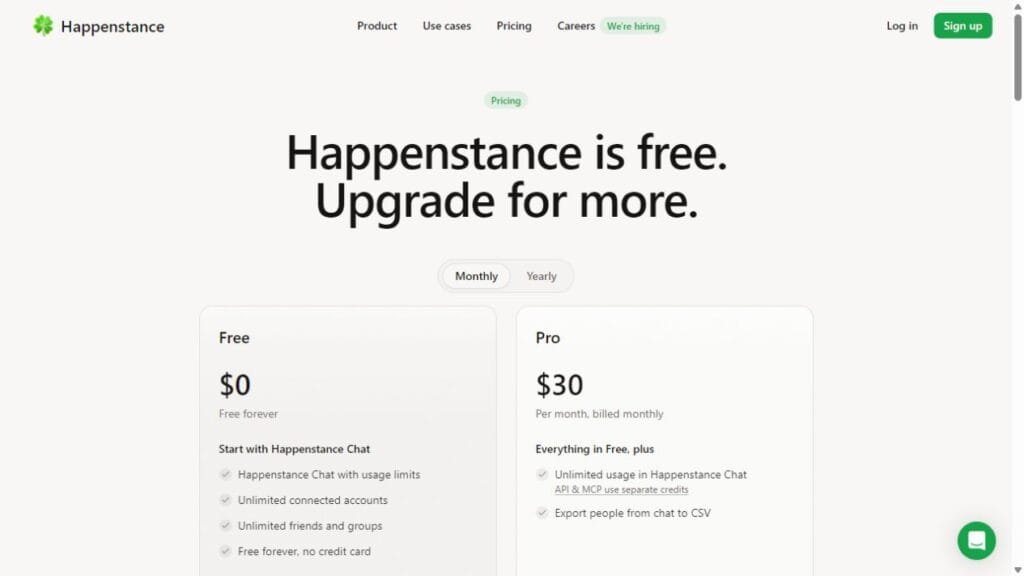
The free plan is a good starting point for connecting with your contacts and asking initial questions. The pricing page doesn't specify a fixed number of free public chat requests, but rather usage limits.
| function | Free | Per |
|---|---|---|
| Preis | $0 | 30 US-Dollar monatlich oder 24 US-Dollar pro Monat bei jährlicher Zahlung |
| Happenstance Chat | Mit Nutzungslimits | Unbegrenzte Nutzung |
| Verbundene Konten, Friends, Groups | Unbegrenzt | Unbegrenzt |
| Personen aus dem Chat als CSV exportieren | Nicht als Free-Leistung aufgeführt | Enthalten |
| API und MCP | Separate Credits | Ebenfalls separate Credits |
Die Jahresvariante entspricht rechnerisch 288 US-Dollar pro Jahr. Steuern und ein regionaler Checkout-Endpreis sind hier nicht eingerechnet. Team bündelt Pro-Plätze, Abrechnung und API-Verbrauch; das reine Teilen in Gruppen benötigt laut Preisseite keine bezahlten Plätze für alle Mitglieder.
Prüfe beim Einrichten vor allem zwei Dinge: Wer darf dein Netzwerk durchsuchen, und was zeigt dein öffentliches Profil? Laut Security-Seite können du selbst, akzeptierte Happenstance-Freunde und deine Gruppen das freigegebene Netzwerk durchsuchen. Daneben zeigt das öffentliche Profil standardmäßig eine „network constellation“ mit Namen von Bekannten. Diese Anzeige lässt sich abschalten.
Für E-Mail und DMs verspricht Happenstance, keine Texte oder Anhänge auf seine Server zu übernehmen. Suchergebnisse sollen auch keine Inhalte oder Aktualität privater Kommunikation offenlegen. Netzwerkdaten würden nicht zum AI-Training verwendet; Verarbeitung und Speicherung erfolgen laut Security-FAQ in den USA.
Beim Trennen eines Kontos stoppt die Synchronisierung. Importierte Daten werden laut Anbieter gelöscht oder de-identifiziert, mit Ausnahmen für rechtliche und Sicherheitszwecke. Die Privacy Policy beschreibt daneben die Verarbeitung durch Dienstleister und von Nutzungsdaten. Sie präzisiert auch die besonderen Grenzen für verbundene Google-Daten. Der konkrete Nutzen für deinen Start: Verbinde zunächst eine passende Quelle, sieh dir die Freigaben an und erweitere erst danach.
Nimm eine Frage, die du gerade wirklich hast: „Wen kenne ich, der mir dieses Thema erklären kann?“ Verbinde die passende Quelle und beschreibe die gesuchte Erfahrung möglichst konkret. Wenn ein Treffer interessant ist, kläre den beruflichen Hintergrund und schau nach dem kürzesten glaubwürdigen Kontaktweg. Bei Bedarf kommen Friends und Groups hinzu.
Für eine OSINT-Recherche liefert dir das eine Person zum Weiterfragen oder eine Kontaktspur, die du mit öffentlichen Profilen und anderen Quellen vertiefen kannst. Falls eine Plattform als einheitliches Dashboard zur Überwachung globaler Ereignisse, Konflikte, Naturkatastrophen, Märkte und Bedrohungen benötigt wird: findest du in unserem Beitrag What is SitDeck – and where do you begin?.
A notice: Für diesen Artikel wurden die öffentlich zugänglichen Bereiche, der Datenkatalog sowie die offiziellen Produkt- und Entwicklerunterlagen geprüft. Für den eingeloggten Bereich stand kein Konto mit verbundenen Kontakten zur Verfügung. Die beschriebenen Workflows basieren daher auf der offiziellen Dokumentation. Die englischen Beispielanfragen sind eigene Vorlagen und keine tatsächlich ausgeführten Suchergebnisse. Stand: 11. November 2026.